WordPress plugin
Product Slider for WooCommerce Premium: Pick Products, Set Columns
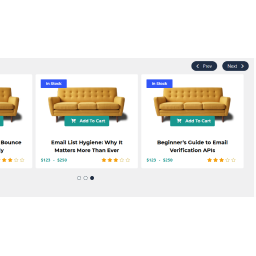
Product Slider for WooCommerce Premium creates product sliders that you can place with shortcodes. Create unlimited sliders and use the layout builder to assemble product presentations and a custom product wrapper without coding. Set separate column counts for desktop, tablet, and mobile.
Build and place product carousels
Product Slider for WooCommerce Premium creates product sliders that you can place with shortcodes. Create unlimited sliders and use the layout builder to assemble product presentations and a custom product wrapper without coding. Set separate column counts for desktop, tablet, and mobile.
Choose products for each slider
Set a product query limit, such as the number of recently released products to display. Premium includes these product selections and filters:
- Recently viewed products, based on customer browsing.
- Related products based on the current product’s categories and tags, or products queried from upsells and cross-sells.
- Best-selling products filtered by categories, tags, custom taxonomies, or attributes.
- Top-rated products filtered by categories, tags, custom taxonomies, or attributes.
- Advanced product queries using meta fields.
- Featured products displayed first, followed by other products.
Set movement and navigation
Autoplay can begin after the page loads, with custom options for speed and timeout. Rewind returns to the first product, while loop mode keeps products moving continuously. Stop on hover pauses movement while a customer inspects a product. Center mode places one product in the middle with partial products visible on both sides.
- Display navigation buttons, pick their position and a predefined style, and adjust movement speed, background color, and text color.
- Add pagination dots for moving through product screens. Customize their speed, background, hover, and active colors.
- Let visitors move through products with touch or mouse dragging.
- Use right-to-left support for RTL languages.
Customize product details and styling
Add layout elements such as stock status, stock quantity, weight, dimensions, a share button, recently viewed text, and meta fields. Style product ribbons with a background color, text color, height, width, or background picture, and choose from the top-right, top-left, bottom-left, and bottom-right positions.
Product entries can have custom padding, margins, background color, and text alignment. The slider container has its own padding, margins, background color, and background image settings.
Set up and display a slider
Create a product slider in the plugin settings, then choose its product query, layout elements, responsive columns, and movement settings. Configure navigation, dots, styling, and product details as needed, save the slider, and place it with its shortcode. Lazy loading can delay product thumbnails outside the current view.