WordPress plugin
Responsive Pricing Table Pro: Toggle Monthly or Yearly Prices
Responsive Pricing Table Pro is the paid edition of Responsive Pricing Table for WordPress. Create a table of plans, prices, functions, and buttons, then display it on a page or post with a shortcode.
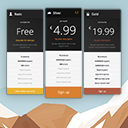
Compare plans and billing periods
Responsive Pricing Table Pro is the paid edition of Responsive Pricing Table for WordPress. Create a table of plans, prices, functions, and buttons, then display it on a page or post with a shortcode.
In the Pricing Tables area of the administration panel, add each plan’s title, subtitle, description, price, and recurrence label, such as “per month” or “one-time fee.” Plans can also include a small icon, a capability list, and a button with its own text and URL. Custom buttons, including Stripe and PayPal buttons, are supported.
Billing and layout options
- Price toggle: Let visitors switch between pricing periods such as monthly and yearly when an offer has multiple billing options.
- Pricing plan equalizer: Help align plans when their content differs.
- Additional designs and layouts: Choose another supported arrangement for the comparison.
- Feature tooltips: Add information bubbles to explain individual capabilities without putting longer explanations directly in the table.
These options fit subscription plans, service levels, and packages with many included features. A toggle groups billing periods in one table, while tooltips keep feature explanations close to the entry they describe.
Plan appearance and display
Set a color for each plan and highlight a recommended option when appropriate. You can change or remove the currency sign, choose whether links open in the current or a new window, and apply custom CSS classes. Other options include title alignment, font-size presets, and an option to force the add-on’s original fonts.
After configuring the plans and Pro options, copy the generated shortcode into the WordPress page or post where the comparison should appear.